


保障性住房 特区发展 东莞发展 深圳知识产权 转创法信事务所(深圳) 入户政策 深圳管理 东莞教育 大朗镇 深圳人社 东莞质量 深圳教育 大亚湾新区 罗湖区 大鹏区 龙岗区 福田区 南山区 盐田区 宝安区 龙岗区 龙华区 坪山区 光明区 深圳金融 前海区
广州知识产权 国际金融后台基地 佛山发展 广东金融高新区 佛山国家高新区 南海区 禅城区 顺德区 荔湾区 花都区 天河区 黄埔区 越秀区 海珠区 番禺区 白云区 南沙自贸区 从化区 南海区 广州发展 信用广州 佛山政务 信用佛山 荔湾区 人社与教育 增城区 佛山教育
Python 3中使用ARIMA进行时间序列预测的指南
时间序列预测方法之一,称为ARIMA。
用于建模和预测时间序列未来点的Python中的一种方法被称为SARIMAX ,其代表具有eXogenous回归的季节性自动反馈集成移动平均值 。 在这里,我们将主要关注ARIMA组件,该组件用于适应时间序列数据,以更好地了解和预测时间序列中的未来点。
时间序列预测——ARIMA(差分自回归移动平均模型)
ARIMA(p,d,q)中,AR是"自回归",p为自回归项数;I为差分,d为使之成为平稳序列所做的差分次数(阶数);MA为"滑动平均",q为滑动平均项数,。ACF自相关系数能决定q的取值,PACF偏自相关系数能够决定q的取值。ARIMA原理:将非平稳时间序列转化为平稳时间序列然后将因变量仅对它的滞后值以及随机误差项的现值和滞后值进行回归所建立的模型
基本解释:
自回归模型(AR)
描述当前值与历史值之间的关系,用变量自身的历史时间数据对自身进行预测
自回归模型必须满足平稳性的要求
必须具有自相关性,自相关系数小于0.5则不适用
p阶自回归过程的公式定义:
![P2W2]E%B]GJG)EZ$S0CF2E1.png](/upload/image/product/20230720/20230720483313.png)
PACF,偏自相关函数(决定p值),剔除了中间k-1个随机变量x(t-1)、x(t-2)、……、x(t-k+1)的干扰之后x(t-k)对x(t)影响的相关程度。
移动平均模型(MA)
移动平均模型关注的是自回归模型中的误差项的累加,移动平均法能有效地消除预测中的随机波动
q阶自回归过程的公式定义:

ACF,自相关函数(决定q值)反映了同一序列在不同时序的取值之间的相关性。x(t)同时还会受到中间k-1个随机变量x(t-1)、x(t-2)、……、x(t-k+1)的影响而这k-1个随机变量又都和x(t-k)具有相关关系,所 以自相关系数p(k)里实际掺杂了其他变量对x(t)与x(t-k)的影响
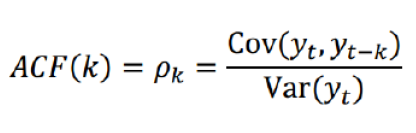
ARIMA(p,d,q)阶数确定:

截尾:落在置信区间内(95%的点都符合该规则)

acf和pacf图
平稳性要求:平稳性就是要求经由样本时间序列所得到的拟合曲线在未来的一段期间内仍能顺着现有的形态“惯性”地延续下去
平稳性要求序列的均值和方差不发生明显变化。
具体分为严平稳与弱平稳:
严平稳:严平稳表示的分布不随时间的改变而改变。
如:白噪声(正态),无论怎么取,都是期望为0,方差为1
弱平稳:期望与相关系数(依赖性)不变
未来某时刻的t的值Xt就要依赖于它的过去信息,所以需要依赖性
因为实际生活中我们拿到的数据基本都是弱平稳数据,为了保证ARIMA模型的要求,我们需要对数据进行差分,以求数据变的平稳。
模型评估:
AIC:赤池信息准则(AkaikeInformation Criterion,AIC)
???=2?−2ln(?)
BIC:贝叶斯信息准则(Bayesian Information Criterion,BIC)
???=????−2ln(?)
k为模型参数个数,n为样本数量,L为似然函数
模型残差检验:
ARIMA模型的残差是否是平均值为0且方差为常数的正态分布
QQ图:线性即正态分布
先决条件
本指南将介绍如何在本地桌面或远程服务器上进行时间序列分析。 使用大型数据集可能是内存密集型的,所以在这两种情况下,计算机将至少需要2GB的内存来执行本指南中的一些计算。
要充分利用本教程,熟悉时间序列和统计信息可能会有所帮助。
对于本教程,我们将使用Jupyter Notebook来处理数据。 如果您还没有,您应该遵循我们的教程安装和设置Jupyter Notebook for Python 3 。
第1步 - 安装软件包
为了建立我们的时间序列预测环境,我们先进入本地编程环境或基于服务器的编程环境:
cd environments
. my_env/bin/activate
从这里,我们为我们的项目创建一个新的目录。 我们称之为ARIMA ,然后进入目录。 如果您将项目称为不同名称,请务必在整个指南中将您的名称替换为ARIMA
mkdir ARIMA
cd ARIMA
本教程将需要warnings , itertools , itertools , numpy , matplotlib和statsmodels库。 warnings和itertools库包含在标准Python库集中,因此您不需要安装它们。
像其他Python包一样,我们可以用pip安装这些要求。
我们现在可以安装pandas , statsmodels和数据绘图包matplotlib 。 它们的依赖也将被安装:
pip install pandas numpy statsmodels matplotlib
在这一点上,我们现在设置为开始使用已安装的软件包。
第2步 - 导入包并加载数据
要开始使用我们的数据,我们将启动Jupyter Notebook:
jupyter notebook
要创建新的笔记本文件,请从右上角的下拉菜单中选择新建 > Python 3 :

这将打开一个笔记本。
最好的做法是,从笔记本电脑的顶部导入需要的库:
import warnings
import itertools
import pandas as pd
import numpy as np
import statsmodels.api as sm
import matplotlib.pyplot as plt
plt.style.use('fivethirtyeight')
我们还为我们的地块定义了一个matplotlib风格 。
我们将使用一个名为“来自美国夏威夷Mauna Loa天文台的连续空气样本的大气二氧化碳”的数据集,该数据集从1958年3月至2001年12月期间收集了二氧化碳样本。我们可以提供如下数据:
data = sm.datasets.co2.load_pandas()
y = data.data
让我们稍后再进行一些数据处理。 每周数据可能很棘手,因为它是一个很短的时间,所以让我们使用每月平均值。 我们将使用resample函数进行转换。 为了简单起见,我们还可以使用fillna()函数来确保我们的时间序列中没有缺少值。
# The 'MS' string groups the data in buckets by start of the month
y = y['co2'].resample('MS').mean()
# The term bfill means that we use the value before filling in missing values
y = y.fillna(y.bfill())
print(y)
Outputco2
1958-03-01 316.100000
1958-04-01 317.200000
1958-05-01 317.433333
...
2001-11-01 369.375000
2001-12-01 371.020000
我们来探索这个时间序列e作为数据可视化:
y.plot(figsize=(15, 6))
plt.show()
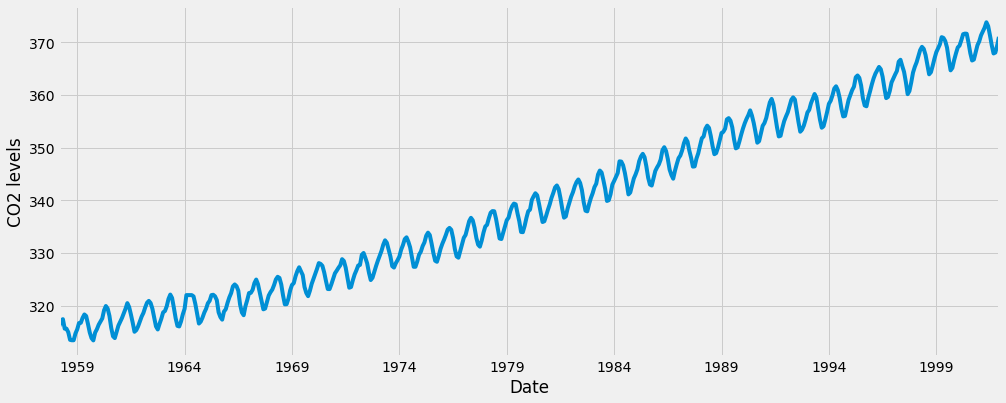
当我们绘制数据时,会出现一些可区分的模式。 时间序列具有明显的季节性格局,总体呈上升趋势。
要了解有关时间序列预处理的更多信息,请参阅“ 使用Python 3进行时间序列可视化的指南 ”,其中上面的步骤将更详细地描述。
现在我们已经转换和探索了我们的数据,接下来我们继续使用ARIMA进行时间序列预测。
第3步 - ARIMA时间序列模型
时间序列预测中最常用的方法之一就是被称为ARIMA模型,它代表了A utoreg R essive综合M oving A版本 。 ARIMA是可以适应时间序列数据的模型,以便更好地了解或预测系列中的未来点。
有三个不同的整数( p , d , q )用于参数化ARIMA模型。 因此,ARIMA模型用符号ARIMA(p, d, q) 。 这三个参数共计数据集中的季节性,趋势和噪音:
p是模型的自回归部分。 它允许我们将过去价值观的影响纳入我们的模型。 直观地说,这将是类似的,表示如果过去3天已经变暖,明天可能会变暖。
d是模型的集成部分。 这包括模型中包含差异量(即从当前值减去的过去时间点的数量)以适用于时间序列的术语。 直观地说,这将类似于说如果过去三天的温度差异非常小,明天可能会有相同的温度。
q是模型的移动平均部分。 这允许我们将模型的误差设置为过去以前时间点观察到的误差值的线性组合。
在处理季节性影响时,我们利用季节性 ARIMA,表示为ARIMA(p,d,q)(P,D,Q)s 。 这里, (p, d, q)是上述非季节性参数,而(P, D, Q)遵循相同的定义,但适用于时间序列的季节分量。 术语s是时间序列的周期(季度为4 ,年度为12 ,等等)。
由于所涉及的多个调整参数,季节性ARIMA方法可能会令人望而生畏。 在下一节中,我们将介绍如何自动化识别季节性ARIMA时间序列模型的最优参数集的过程。
第4步 - ARIMA时间序列模型的参数选择
当考虑使用季节性ARIMA模型拟合时间序列数据时,我们的第一个目标是找到优化感兴趣度量的ARIMA(p,d,q)(P,D,Q)s的值。 实现这一目标有许多指导方针和最佳实践,但ARIMA模型的正确参数化可能是一个需要领域专长和时间的艰苦的手工过程。 其他统计编程语言(如R提供了自动化的方法来解决这个问题 ,但尚未被移植到Python中。 在本节中,我们将通过编写Python代码来编程选择ARIMA(p,d,q)(P,D,Q)s时间序列模型的最优参数值来解决此问题。
非季节性参数:p,d,q
季节参数:P、D、Q
s:时间序列的周期,年周期s=12
我们将使用“网格搜索”来迭代地探索参数的不同组合。 对于参数的每个组合,我们使用statsmodels模块的SARIMAX()函数拟合一个新的季节性ARIMA模型,并评估其整体质量。 一旦我们探索了参数的整个范围,我们的最佳参数集将是我们感兴趣的标准产生最佳性能的参数。 我们开始生成我们希望评估的各种参数组合:
# Define the p, d and q parameters to take any value between 0 and 2
p = d = q = range(0, 2)
# Generate all different combinations of p, q and q triplets
pdq = list(itertools.product(p, d, q))
# Generate all different combinations of seasonal p, q and q triplets
seasonal_pdq = [(x[0], x[1], x[2], 12) for x in list(itertools.product(p, d, q))]
print('Examples of parameter combinations for Seasonal ARIMA...')
print('SARIMAX: {} x {}'.format(pdq[1], seasonal_pdq[1]))
print('SARIMAX: {} x {}'.format(pdq[1], seasonal_pdq[2]))
print('SARIMAX: {} x {}'.format(pdq[2], seasonal_pdq[3]))
print('SARIMAX: {} x {}'.format(pdq[2], seasonal_pdq[4]))
Output
Examples of parameter combinations for Seasonal ARIMA...
SARIMAX: (0, 0, 1) x (0, 0, 1, 12)
SARIMAX: (0, 0, 1) x (0, 1, 0, 12)
SARIMAX: (0, 1, 0) x (0, 1, 1, 12)
SARIMAX: (0, 1, 0) x (1, 0, 0, 12)
我们现在可以使用上面定义的参数三元组来自动化不同组合对ARIMA模型进行培训和评估的过程。 在统计和机器学习中,这个过程被称为模型选择的网格搜索(或超参数优化)。
在评估和比较配备不同参数的统计模型时,可以根据数据的适合性或准确预测未来数据点的能力,对每个参数进行排序。 我们将使用AIC (Akaike信息标准)值,该值通过使用statsmodels安装的ARIMA型号方便地返回。 AIC衡量模型如何适应数据,同时考虑到模型的整体复杂性。 在使用大量功能的情况下,适合数据的模型将被赋予比使用较少特征以获得相同的适合度的模型更大的AIC得分。 因此,我们有兴趣找到产生最低AIC值的模型。
下面的代码块通过参数的组合来迭代,并使用SARIMAX函数来适应相应的季节性ARIMA模型。 这里, order参数指定(p, d, q)参数,而seasonal_order参数指定季节性ARIMA模型的(P, D, Q, S)季节分量。 在安装每个SARIMAX()模型后,代码打印出其各自的AIC得分。
warnings.filterwarnings("ignore") # specify to ignore warning messages
for param in pdq:
for param_seasonal in seasonal_pdq:
try:
mod = sm.tsa.statespace.SARIMAX(y,
order=param,
seasonal_order=param_seasonal,
enforce_stationarity=False,
enforce_invertibility=False)
results = mod.fit()
print('ARIMA{}x{}12 - AIC:{}'.format(param, param_seasonal, results.aic))
except:
continue
由于某些参数组合可能导致数字错误指定,因此我们明确禁用警告消息,以避免警告消息过载。 这些错误指定也可能导致错误并引发异常,因此我们确保捕获这些异常并忽略导致这些问题的参数组合。
上面的代码应该产生以下结果,这可能需要一些时间:
Output
SARIMAX(0, 0, 0)x(0, 0, 1, 12) - AIC:6787.3436240402125
SARIMAX(0, 0, 0)x(0, 1, 1, 12) - AIC:1596.711172764114
SARIMAX(0, 0, 0)x(1, 0, 0, 12) - AIC:1058.9388921320026
SARIMAX(0, 0, 0)x(1, 0, 1, 12) - AIC:1056.2878315690562
SARIMAX(0, 0, 0)x(1, 1, 0, 12) - AIC:1361.6578978064144
SARIMAX(0, 0, 0)x(1, 1, 1, 12) - AIC:1044.7647912940095
...
...
...
SARIMAX(1, 1, 1)x(1, 0, 0, 12) - AIC:576.8647112294245
SARIMAX(1, 1, 1)x(1, 0, 1, 12) - AIC:327.9049123596742
SARIMAX(1, 1, 1)x(1, 1, 0, 12) - AIC:444.12436865161305
SARIMAX(1, 1, 1)x(1, 1, 1, 12) - AIC:277.7801413828764
我们的代码的输出表明, SARIMAX(1, 1, 1)x(1, 1, 1, 12)产生最低的AIC值为277.78。 因此,我们认为这是我们考虑过的所有模型中的最佳选择。
第5步 - 安装ARIMA时间序列模型
使用网格搜索,我们已经确定了为我们的时间序列数据生成最佳拟合模型的参数集。 我们可以更深入地分析这个特定的模型。
我们首先将最佳参数值插入到新的SARIMAX模型中:
mod = sm.tsa.statespace.SARIMAX(y,
order=(1, 1, 1),
seasonal_order=(1, 1, 1, 12),
enforce_stationarity=False,
enforce_invertibility=False)
results = mod.fit()
print(results.summary().tables[1]) #详细输出,results.summary()可以输出全部的模型计算参数表
Output
==============================================================================
coef std err z P>|z| [0.025 0.975]
------------------------------------------------------------------------------
ar.L1 0.3182 0.092 3.443 0.001 0.137 0.499
ma.L1 -0.6255 0.077 -8.165 0.000 -0.776 -0.475
ar.S.L12 0.0010 0.001 1.732 0.083 -0.000 0.002
ma.S.L12 -0.8769 0.026 -33.811 0.000 -0.928 -0.826
sigma2 0.0972 0.004 22.634 0.000 0.089 0.106
==============================================================================
由SARIMAX的输出产生的SARIMAX返回大量的信息,但是我们将注意力集中在系数表上。 coef列显示每个特征的重量(即重要性)以及每个特征如何影响时间序列。 P>|z| 列通知我们每个特征重量的意义。 这里,每个重量的p值都低于或接近0.05 ,所以在我们的模型中保留所有权重是合理的。
在 fit 季节性ARIMA模型(以及任何其他模型)的情况下,运行模型诊断是非常重要的,以确保没有违反模型的假设。 plot_diagnostics对象允许我们快速生成模型诊断并调查任何异常行为。
results.plot_diagnostics(figsize=(15, 12))
plt.show()
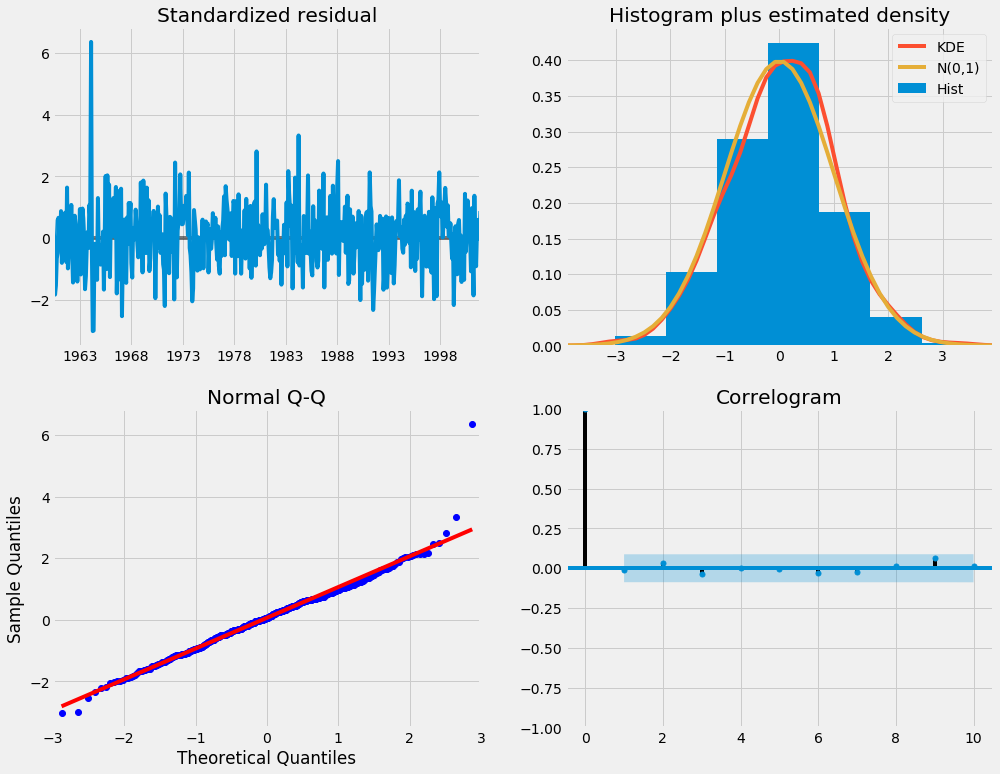
我们的主要关切是确保我们的模型的残差是不相关的,并且平均分布为零。 如果季节性ARIMA模型不能满足这些特性,这是一个很好的迹象,可以进一步改善。
残差在数理统计中是指实际观察值与估计值(拟合值)之间的差。“残差”蕴含了有关模型基本假设的重要信息。如果回归模型正确的话, 我们可以将残差看作误差的观测值。 它应符合模型的假设条件,且具有误差的一些性质。利用残差所提供的信息,来考察模型假设的合理性及数据的可靠性称为残差分析
在这种情况下,我们的模型诊断表明,模型残差正常分布如下:
在右上图中,我们看到红色KDE线与N(0,1)行(其中N(0,1) )是正态分布的标准符号,平均值0 ,标准偏差为1 ) 。 这是残留物正常分布的良好指示。
左下角的qq图显示,残差(蓝点)的有序分布遵循采用N(0, 1)的标准正态分布采样的线性趋势。 同样,这是残留物正常分布的强烈指示。
随着时间的推移(左上图)的残差不会显示任何明显的季节性,似乎是白噪声。 这通过右下角的自相关(即相关图)来证实,这表明时间序列残差与其本身的滞后值具有低相关性。
这些观察结果使我们得出结论,我们的模型选择了令人满意,可以帮助我们了解我们的时间序列数据和预测未来价值。
虽然我们有一个令人满意的结果,我们的季节性ARIMA模型的一些参数可以改变,以改善我们的模型拟合。 例如,我们的网格搜索只考虑了一组受限制的参数组合,所以如果我们拓宽网格搜索,我们可能会找到更好的模型。
第6步 - 验证预测
我们已经获得了我们时间序列的模型,现在可以用来产生预测。 我们首先将预测值与时间序列的实际值进行比较,这将有助于我们了解我们的预测的准确性。 get_prediction()和conf_int()属性允许我们获得时间序列预测的值和相关的置信区间。
pred = results.get_prediction(start=pd.to_datetime('1998-01-01'), dynamic=False)#预测值
pred_ci = pred.conf_int()#置信区间
上述规定需要从1998年1月开始进行预测。
dynamic=False参数确保我们每个点的预测将使用之前的所有历史观测。
我们可以绘制二氧化碳时间序列的实际值和预测值,以评估我们做得如何。 注意我们如何在时间序列的末尾放大日期索引。
ax = y['1990':].plot(label='observed')
pred.predicted_mean.plot(ax=ax, label='One-step ahead Forecast', alpha=.7)
ax.fill_between(pred_ci.index,
pred_ci.iloc[:, 0],
pred_ci.iloc[:, 1], color='k', alpha=.2)
#图形填充fill fill_between,参考网址:
#https://www.cnblogs.com/gengyi/p/9416845.html
ax.set_xlabel('Date')
ax.set_ylabel('CO2 Levels')
plt.legend()
plt.show()
pred.predicted_mean 可以得到预测均值,就是置信区间的上下加和除以2
函数间区域填充 fill_between用法:
plt.fill_between( x, y1, y2=0, where=None, interpolate=False, step=None, hold=None,data=None, **kwarg)
x - array( length N) 定义曲线的 x 坐标
y1 - array( length N ) or scalar 定义第一条曲线的 y 坐标
y2 - array( length N ) or scalar 定义第二条曲线的 y 坐标
where - array of bool (length N), optional, default: None 排除一些(垂直)区域被填充。注:我理解的垂直区域,但帮助文档上写的是horizontal regions
也可简单地描述为:
plt.fill_between(x,y1,y2,where=条件表达式, color=颜色,alpha=透明度)" where = " 可以省略,直接写条件表达式

总体而言,我们的预测与真实价值保持一致,呈现总体增长趋势。
量化预测的准确性
这是很有必要的。 我们将使用MSE(均方误差,也就是方差),它总结了我们的预测的平均误差。 对于每个预测值,我们计算其到真实值的距离并对结果求平方。 结果需要平方,以便当我们计算总体平均值时,正/负差异不会相互抵消。
y_forecasted = pred.predicted_mean
y_truth = y['1998-01-01':]
# Compute the mean square error
mse = ((y_forecasted - y_truth) ** 2).mean()
print('The Mean Squared Error of our forecasts is {}'.format(round(mse, 2)))
Output
The Mean Squared Error of our forecasts is 0.07
我们前进一步预测的MSE值为0.07 ,这是接近0的非常低的值。MSE=0是预测情况将是完美的精度预测参数的观测值,但是在理想的场景下通常不可能。
然而,使用动态预测(dynamic=True)可以获得更好地表达我们的真实预测能力。 在这种情况下,我们只使用时间序列中的信息到某一点,之后,使用先前预测时间点的值生成预测。
在下面的代码块中,我们指定从1998年1月起开始计算动态预测和置信区间。
pred_dynamic = results.get_prediction(start=pd.to_datetime('1998-01-01'), dynamic=True, full_results=True)
pred_dynamic_ci = pred_dynamic.conf_int()
绘制时间序列的观测值和预测值,我们看到即使使用动态预测,总体预测也是准确的。 所有预测值(红线)与地面真相(蓝线)相当吻合,并且在我们预测的置信区间内。
ax = y['1990':].plot(label='observed', figsize=(20, 15))
pred_dynamic.predicted_mean.plot(label='Dynamic Forecast', ax=ax)
ax.fill_between(pred_dynamic_ci.index,
pred_dynamic_ci.iloc[:, 0],
pred_dynamic_ci.iloc[:, 1], color='k', alpha=.25)
ax.fill_betweenx(ax.get_ylim(), pd.to_datetime('1998-01-01'), y.index[-1],
alpha=.1, zorder=-1)
ax.set_xlabel('Date')
ax.set_ylabel('CO2 Levels')
plt.legend()
plt.show()
我们再次通过计算MSE量化我们预测的预测性能:
# Extract the predicted and true values of our time-series
y_forecasted = pred_dynamic.predicted_mean
y_truth = y['1998-01-01':]
# Compute the mean square error
mse = ((y_forecasted - y_truth) ** 2).mean()
print('The Mean Squared Error of our forecasts is {}'.format(round(mse, 2)))
OutputThe Mean Squared Error of our forecasts is 1.01
从动态预测获得的预测值产生1.01的MSE。 这比前进一步略高,这是意料之中的,因为我们依赖于时间序列中较少的历史数据。
前进一步和动态预测都证实了这个时间序列模型是有效的。 然而,关于时间序列预测的大部分兴趣是能够及时预测未来价值观。
第7步 - 生成和可视化预测
在本教程的最后一步,我们将介绍如何利用季节性ARIMA时间序列模型来预测未来的价值。 我们的时间序列对象的
get_forecast()属性可以计算预先指定数量的步骤的预测值。
# Get forecast 500 steps ahead in future
pred_uc = results.get_forecast(steps=500)
# Get confidence intervals of forecasts
pred_ci = pred_uc.conf_int()
我们可以使用此代码的输出绘制其未来值的时间序列和预测。
ax = y.plot(label='observed', figsize=(20, 15))
pred_uc.predicted_mean.plot(ax=ax, label='Forecast')
ax.fill_between(pred_ci.index,
pred_ci.iloc[:, 0],
pred_ci.iloc[:, 1], color='k', alpha=.25)
ax.set_xlabel('Date')
ax.set_ylabel('CO2 Levels')
plt.legend()
plt.show()
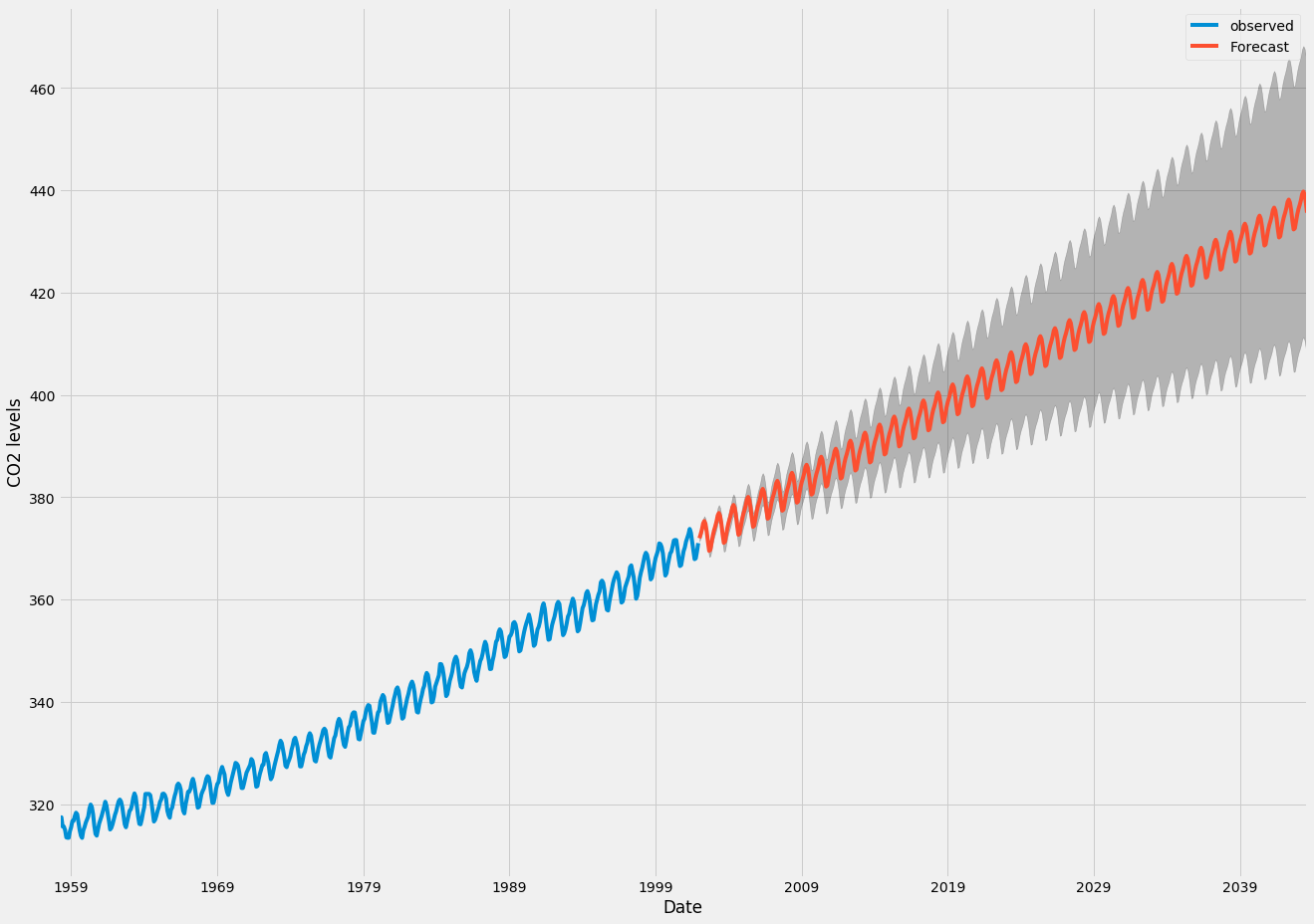
现在可以使用我们生成的预测和相关的置信区间来进一步了解时间序列并预见预期。 我们的预测显示,时间序列预计将继续稳步增长。
随着我们对未来的进一步预测,我们对自己的价值观信心愈来愈自然。 这反映在我们的模型产生的置信区间,随着我们进一步走向未来,这个模型越来越大。
结论
在本教程中,我们描述了如何在Python中实现季节性ARIMA模型。 我们广泛使用了pandas和statsmodels图书馆,并展示了如何运行模型诊断,以及如何产生二氧化碳时间序列的预测。
这里还有一些其他可以尝试的事情:
更改动态预测的开始日期,以了解其如何影响预测的整体质量。
尝试更多的参数组合,看看是否可以提高模型的适合度。
选择不同的指标以选择最佳模型。 例如,我们使用AIC测量来找到最佳模型,但是您可以寻求优化采样均方误差
补充:其中一些好用的方法,代码如下:
filename_ts = 'data/series1.csv'
ts_df = pd.read_csv(filename_ts, index_col=0, parse_dates=[0])
n_sample = ts_df.shape[0]
print(ts_df.shape)
print(ts_df.head())
# Create a training sample and testing sample before analyzing the series
n_train=int(0.95*n_sample)+1
n_forecast=n_sample-n_train
#ts_df
ts_train = ts_df.iloc[:n_train]['value']
ts_test = ts_df.iloc[n_train:]['value']
print(ts_train.shape)
print(ts_test.shape)
print("Training Series:", "\n", ts_train.tail(), "\n")
print("Testing Series:", "\n", ts_test.head())
def tsplot(y, lags=None, title='', figsize=(14, 8)):
fig = plt.figure(figsize=figsize)
layout = (2, 2)
ts_ax = plt.subplot2grid(layout, (0, 0))
hist_ax = plt.subplot2grid(layout, (0, 1))
acf_ax = plt.subplot2grid(layout, (1, 0))
pacf_ax = plt.subplot2grid(layout, (1, 1))
y.plot(ax=ts_ax) # 折线图
ts_ax.set_title(title)
y.plot(ax=hist_ax, kind='hist', bins=25) #直方图
hist_ax.set_title('Histogram')
smt.graphics.plot_acf(y, lags=lags, ax=acf_ax) # ACF自相关系数
smt.graphics.plot_pacf(y, lags=lags, ax=pacf_ax) # 偏自相关系数
[ax.set_xlim(0) for ax in [acf_ax, pacf_ax]]
sns.despine()
fig.tight_layout()
return ts_ax, acf_ax, pacf_ax
tsplot(ts_train, title='A Given Training Series', lags=20);
# 此处运用BIC(贝叶斯信息准则)进行模型参数选择
# 另外还可以利用AIC(赤池信息准则),视具体情况而定
import itertools
p_min = 0
d_min = 0
q_min = 0
p_max = 4
d_max = 0
q_max = 4
# Initialize a DataFrame to store the results
results_bic = pd.DataFrame(index=['AR{}'.format(i) for i in range(p_min,p_max+1)],
columns=['MA{}'.format(i) for i in range(q_min,q_max+1)])
for p,d,q in itertools.product(range(p_min,p_max+1),
range(d_min,d_max+1),
range(q_min,q_max+1)):
if p==0 and d==0 and q==0:
results_bic.loc['AR{}'.format(p), 'MA{}'.format(q)] = np.nan
continue
try:
model = sm.tsa.SARIMAX(ts_train, order=(p, d, q),
#enforce_stationarity=False,
#enforce_invertibility=False,
)
results = model.fit() ##下面可以显示具体的参数结果表
## print(model_results.summary())
## print(model_results.summary().tables[1])
# http://www.statsmodels.org/stable/tsa.html
# print("results.bic",results.bic)
# print("results.aic",results.aic)
results_bic.loc['AR{}'.format(p), 'MA{}'.format(q)] = results.bic
except:
continue
results_bic = results_bic[results_bic.columns].astype(float)
results_bic如下所示:
为了便于观察,下面对上表进行可视化:、
fig, ax = plt.subplots(figsize=(10, 8))
ax = sns.heatmap(results_bic,
mask=results_bic.isnull(),
ax=ax,
annot=True,
fmt='.2f',
);
ax.set_title('BIC');
//annot
//annotate的缩写,annot默认为False,当annot为True时,在heatmap中每个方格写入数据
//annot_kws,当annot为True时,可设置各个参数,包括大小,颜色,加粗,斜体字等
# annot_kws={'size':9,'weight':'bold', 'color':'blue'}
#具体查看:https://blog.csdn.net/m0_38103546/article/details/79935671
# Alternative model selection method, limited to only searching AR and MA parameters
train_results = sm.tsa.arma_order_select_ic(ts_train, ic=['aic', 'bic'], trend='nc', max_ar=4, max_ma=4)
print('AIC', train_results.aic_min_order)
print('BIC', train_results.bic_min_order)
注:
SARIMA总代码如下:
"""
https://www.howtoing.com/a-guide-to-time-series-forecasting-with-arima-in-python-3/
http://www.statsmodels.org/stable/datasets/index.html
"""
import warnings
import itertools
import pandas as pd
import numpy as np
import statsmodels.api as sm
import matplotlib.pyplot as plt
plt.style.use('fivethirtyeight')
'''
1-Load Data
Most sm.datasets hold convenient representations of the data in the attributes endog and exog.
If the dataset does not have a clear interpretation of what should be an endog and exog,
then you can always access the data or raw_data attributes.
https://docs.scipy.org/doc/numpy/reference/generated/numpy.recarray.html
http://pandas.pydata.org/pandas-docs/stable/generated/pandas.DataFrame.resample.html
# resample('MS') groups the data in buckets by start of the month,
# after that we got only one value for each month that is the mean of the month
# fillna() fills NA/NaN values with specified method
# 'bfill' method use Next valid observation to fill gap
# If the value for June is NaN while that for July is not, we adopt the same value
# as in July for that in June
'''
data = sm.datasets.co2.load_pandas()
y = data.data # DataFrame with attributes y.columns & y.index (DatetimeIndex)
print(y)
names = data.names # tuple
raw = data.raw_data # float64 np.recarray
y = y['co2'].resample('MS').mean()
print(y)
y = y.fillna(y.bfill()) # y = y.fillna(method='bfill')
print(y)
y.plot(figsize=(15,6))
plt.show()
'''
2-ARIMA Parameter Seletion
ARIMA(p,d,q)(P,D,Q)s
non-seasonal parameters: p,d,q
seasonal parameters: P,D,Q
s: period of time series, s=12 for annual period
Grid Search to find the best combination of parameters
Use AIC value to judge models, choose the parameter combination whose
AIC value is the smallest
https://docs.python.org/3/library/itertools.html
http://www.statsmodels.org/stable/generated/statsmodels.tsa.statespace.sarimax.SARIMAX.html
'''
# Define the p, d and q parameters to take any value between 0 and 2
p = d = q = range(0, 2)
# Generate all different combinations of p, q and q triplets
pdq = list(itertools.product(p, d, q))
# Generate all different combinations of seasonal p, q and q triplets
seasonal_pdq = [(x[0], x[1], x[2], 12) for x in pdq]
print('Examples of parameter combinations for Seasonal ARIMA...')
print('SARIMAX: {} x {}'.format(pdq[1], seasonal_pdq[1]))
print('SARIMAX: {} x {}'.format(pdq[1], seasonal_pdq[2]))
print('SARIMAX: {} x {}'.format(pdq[2], seasonal_pdq[3]))
print('SARIMAX: {} x {}'.format(pdq[2], seasonal_pdq[4]))
warnings.filterwarnings("ignore") # specify to ignore warning messages
for param in pdq:
for param_seasonal in seasonal_pdq:
try:
mod = sm.tsa.statespace.SARIMAX(y,
order=param,
seasonal_order=param_seasonal,
enforce_stationarity=False,
enforce_invertibility=False)
results = mod.fit()
print('ARIMA{}x{}12 - AIC:{}'.format(param, param_seasonal, results.aic))
except:
continue
'''
3-Optimal Model Analysis
Use the best parameter combination to construct ARIMA model
Here we use ARIMA(1,1,1)(1,1,1)12
the output coef represents the importance of each feature
mod.fit() returnType: MLEResults
http://www.statsmodels.org/stable/generated/statsmodels.tsa.statespace.mlemodel.MLEResults.html#statsmodels.tsa.statespace.mlemodel.MLEResults
Use plot_diagnostics() to check if parameters are against the model hypothesis
model residuals must not be correlated
'''
mod = sm.tsa.statespace.SARIMAX(y,
order=(1, 1, 1),
seasonal_order=(1, 1, 1, 12),
enforce_stationarity=False,
enforce_invertibility=False)
results = mod.fit()
print(results.summary().tables[1])
results.plot_diagnostics(figsize=(15, 12))
plt.show()
'''
4-Make Predictions
get_prediction(..., dynamic=False)
Prediction of each point will use all historic observations prior to it
http://www.statsmodels.org/stable/generated/statsmodels.tsa.statespace.mlemodel.MLEResults.get_prediction.html#statsmodels.regression.recursive_ls.MLEResults.get_prediction
http://pandas.pydata.org/pandas-docs/stable/generated/pandas.Series.plot.html
https://matplotlib.org/api/_as_gen/matplotlib.axes.Axes.fill_between.html
'''
pred = results.get_prediction(start=pd.to_datetime('1998-01-01'), dynamic=False)
pred_ci = pred.conf_int() # return the confidence interval of fitted parameters
# plot real values and predicted values
# pred.predicted_mean is a pandas series
ax = y['1990':].plot(label='observed') # ax is a matplotlib.axes.Axes
pred.predicted_mean.plot(ax=ax, label='One-step ahead Forecast', alpha=.7)
# fill_between(x,y,z) fills the area between two horizontal curves defined by (x,y)
# and (x,z). And alpha refers to the alpha transparencies
ax.fill_between(pred_ci.index,
pred_ci.iloc[:, 0],
pred_ci.iloc[:, 1], color='k', alpha=.2)
ax.set_xlabel('Date')
ax.set_ylabel('CO2 Levels')
plt.legend()
plt.show()
# Evaluation of model
y_forecasted = pred.predicted_mean
y_truth = y['1998-01-01':]
# Compute the mean square error
mse = ((y_forecasted - y_truth) ** 2).mean()
print('The Mean Squared Error of our forecasts is {}'.format(round(mse, 2)))
'''
5-Dynamic Prediction
get_prediction(..., dynamic=True)
Prediction of each point will use all historic observations prior to 'start' and
all predicted values prior to the point to predict
'''
pred_dynamic = results.get_prediction(start=pd.to_datetime('1998-01-01'), dynamic=True, full_results=True)
pred_dynamic_ci = pred_dynamic.conf_int()
ax = y['1990':].plot(label='observed', figsize=(20, 15))
pred_dynamic.predicted_mean.plot(label='Dynamic Forecast', ax=ax)
ax.fill_between(pred_dynamic_ci.index,
pred_dynamic_ci.iloc[:, 0],
pred_dynamic_ci.iloc[:, 1], color='k', alpha=.25)
ax.fill_betweenx(ax.get_ylim(), pd.to_datetime('1998-01-01'), y.index[-1],
alpha=.1, zorder=-1)
ax.set_xlabel('Date')
ax.set_ylabel('CO2 Levels')
plt.legend()
plt.show()
# Extract the predicted and true values of our time-series
y_forecasted = pred_dynamic.predicted_mean
y_truth = y['1998-01-01':]
# Compute the mean square error
mse = ((y_forecasted - y_truth) ** 2).mean()
print('The Mean Squared Error of our forecasts is {}'.format(round(mse, 2)))
'''
6-Visualize Prediction
In-sample forecast: forecasting for an observation that was part of the data sample;
Out-of-sample forecast: forecasting for an observation that was not part of the data sample.
'''
# Get forecast 500 steps ahead in future
# 'steps': If an integer, the number of steps to forecast from the end of the sample.
pred_uc = results.get_forecast(steps=500) # retun out-of-sample forecast
# Get confidence intervals of forecasts
pred_ci = pred_uc.conf_int()
ax = y.plot(label='observed', figsize=(20, 15))
pred_uc.predicted_mean.plot(ax=ax, label='Forecast')
ax.fill_between(pred_ci.index,
pred_ci.iloc[:, 0],
pred_ci.iloc[:, 1], color='k', alpha=.25)
ax.set_xlabel('Date')
ax.set_ylabel('CO2 Levels')
plt.legend()
plt.show()
© 2024 All rights reserved. 北京转创国际管理咨询有限公司 备案号: 京ICP备19055770号-4
Transverture International Group Co Ltd, Guangdong Branch
地址:广州市天河区天河北路179号尚层国际1601
深圳市福田区深南中路2066号华能大厦
佛山顺德区北滘工业大道云创空间
东莞市大朗镇富丽东路226号松湖世家
梅州市丰顺县留隍镇新兴路881号
长沙市芙蓉区韶山北路139号文化大厦

![_($0PXQFQ7Y(P~4838LJ_]L.png](/upload/image/ann/20240326/20240326729559.png)

欢迎来到本网站,请问有什么可以帮您?
稍后再说 现在咨询